⚡ Open Source · macOS · v1.0.0

Know your
AI spend
in real time

Native macOS menubar app for token usage, context window monitoring, and cost tracking across Claude Code and OpenAI Codex — no API keys, no cloud, data never leaves your machine.

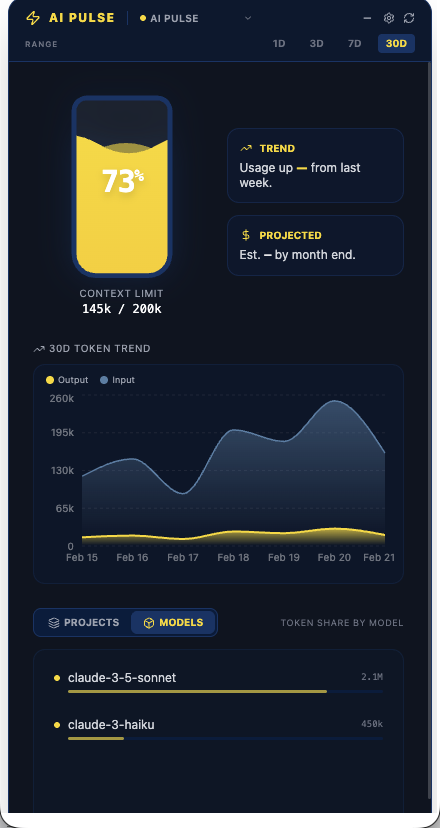
AI Pulse dashboard showing token usage chart, context window gauge, and model breakdown

Three tools. One weekend.
A production desktop app.

A real-world experiment combining AI-assisted UI design, AI-powered development, and a modern native desktop runtime.

Step 01
Google Gemini AI Studio

The full UI — component layout, visual hierarchy, colour system, and interaction patterns — was designed end-to-end using Gemini in Google AI Studio. No Figma, no hand-written CSS from scratch. The output was a working React prototype.

Step 02
Claude Code CLI

Claude Code migrated the Gemini prototype into a production codebase — strict TypeScript, Zod schema validation, and Zustand state management, with the pre-commit hook enforcing Clippy pedantic on every change.

Step 03
Tauri v2 Rust + Claude Code CLI

The Rust backend — JSONL parsers, IPC commands, file-system watcher, tray icon, global shortcut, and LaunchAgent — was built using Tauri v2, guided by Claude Code. No Electron. Binary under 10 MB.

Everything you need,
nothing you don't.

📊

Token usage chart

Area chart of input, output, and cache tokens over 1D / 3D / 7D / 30D. Reads directly from session JSONL files — no polling, no API.

🧠

Context window gauge

Live fill level of your active context window, sourced from the most recent assistant message across all open sessions.

💰

Cost tracking

Lifetime spend computed from token counts × Anthropic's published pricing table. Set a monthly budget and get a warning banner when you exceed it.

📈

Trend indicator

Last-7-day vs previous-7-day token delta, so you can see whether your AI usage is accelerating or settling.

🗂️

Project & model breakdown

Token share by project and by model, with proportional usage bars — so you know where the spend is concentrated.

Live updates

A recursive kqueue file watcher triggers a re-read the moment a session file changes — no manual refresh needed.

⌨️

Global shortcut

Cmd+Shift+A opens the panel from anywhere, even when you're deep in a coding session.

🚀

Launch at login

Optional LaunchAgent via tauri-plugin-autostart — AI Pulse starts silently in the background when you log in.

Modern, typed, native.

A Rust backend for file I/O and IPC, a React frontend for the UI, and Tauri v2 bridging them into a native macOS app with zero Electron overhead.

Tauri v2
Rust (stable)
React 19
TypeScript (strict)
Tailwind CSS v4
Framer Motion
Recharts
Zustand
Zod

Your data stays on your machine.

🔒

No network calls. No telemetry. No API keys.

AI Pulse reads session files that Claude Code and Codex CLI already write to your local filesystem. It never uploads, syncs, or phones home with any data. The only thing it stores are your settings preferences (budget limit, selected timeframe) — in a local Tauri store. That's it.

Built in the open. Contributions welcome.

AI Pulse is MIT licensed. The codebase is small, well-typed, and has a pre-commit hook that keeps everything clean. There are clear areas to pick up without needing to understand the full system.

Gemini data pipeline Windows & Linux support Rust unit tests Codex cost tracking Bug fixes
Read CONTRIBUTING.md Browse open issues